搜索到
13
篇与
web前端
的结果
-
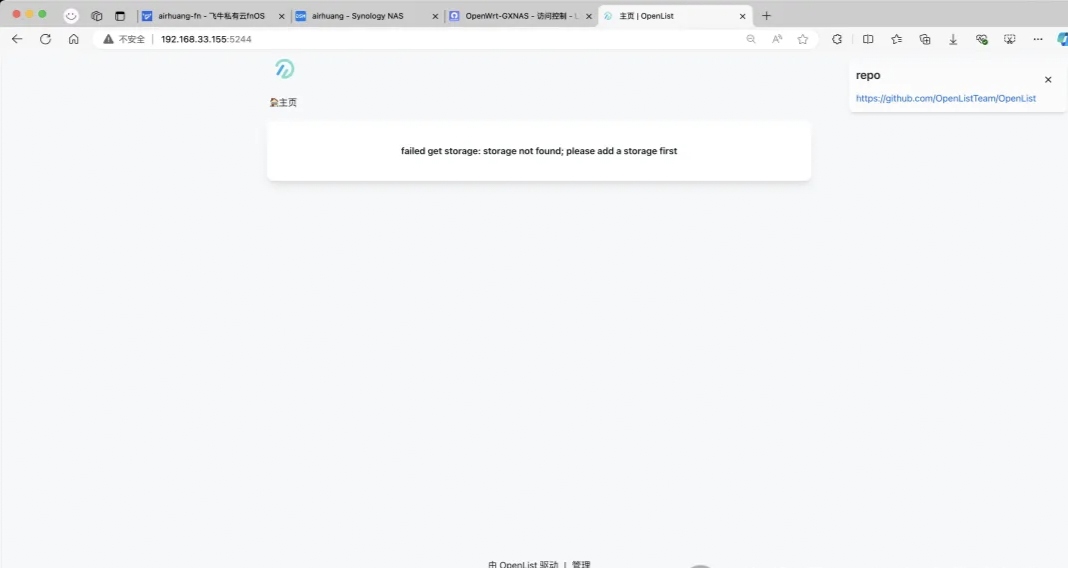
 代替AList网盘的OpenList 前言AList被收购之后,我前几天就停掉了它。但是这几天发现弄文件实在有点不习惯,于是今天想着找找有没有可以替代的项目。找了之后发现还真有,果然大神还是有的!项目地址是:https://github.com/OpenListTeam/openlist这个项目的文档页面是在:https://openlist.team/zh/guide/install/script.html部署好了之后,除了感觉图标不太一样之外,好像其他操作都一样。挂载网盘的方式跟之前使用AList的时候也是一样的,省去了熟悉新软件使用方法的过程,后台管理页面好像也是一样的:开始部署打开进入到飞牛NAS页面打开【Docker】-【Compose】点击【新增项目】项目名称,必须是英文和数字点击路径选择在【docker】文件夹下新建一个文件夹名为【openlist】比较好辨认,再点击【确定】8.这里选择【创建docker-compose.yml】,复制下面内容粘贴过去services: openlist: image: ghcr.io/openlistteam/openlist-git:beta-aio container_name: openlist volumes: - ./openlist:/opt/openlist/data ports: - '5244:5244' environment: - PUID=0 - PGID=0 - UMASK=022 restart: unless-stopped勾选【创建项目后立即启动】就会自动拉取镜像如果到了这一步遇到【ERROR】,则到这个教程最后找解决方法。等待一会儿就完成了,如果无法拉取镜像,则需要更改DNS尝试,这里更改镜像源是无用的(毕竟已经确定了镜像来源出现【Started】和【Exited:0】的时候,说明已经开始了点击【容器】,找到【openlist】容器,点击【...】-【运行日志】找到这个页面标注着【password】的那一行,冒号[:] 后面就是第一次进入页面的临时密码,把它复制一下打开一个新的浏览器页面,输入【飞牛IP:5244】,我这里是【192.168.33.155:5244】,回车就会到达这个页面,账户输入【admin】,密码填写刚刚复制的那个临时密码。最后点击【登录】就能进入第一次进入,页面很空,什么都没有。需要点击页面正下方的【管理】首先需要更改一下密码!弄好这一切之后就可以挂载各类网盘了,支持的类型很多。(请自行查看){lamp/}
 -
-
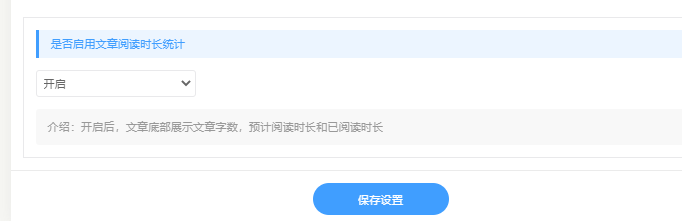
Typecho-Joe主题新增文章阅读时长统计 1.修改functions.php文件,底部增加,文件路径:/usr/themes/Joe// 文章阅读时长设置 $onlineTime = new Typecho_Widget_Helper_Form_Element_Select( 'onlineTime', array( 'off' => '关闭(默认)', 'on' => '开启', ), 'on', '是否启用文章阅读时长统计', '介绍:开启后,文章底部展示文章字数,预计阅读时长和已阅读时长' ); $onlineTime->setAttribute('class', 'joe_content joe_custom'); //如果设置无法展示,请将joe_custom替换为joe_other $form->addInput($onlineTime->multiMode());2.修改article.php文件,文件路径:usr/themes/Joe/public第一段代码<div class="contain" style="margin-bottom: 10px; <?php if(Helper::options()->onlineTime !== 'on') echo 'display:none;' ?>"> <blockquote id="onlineTime">本文共 <?php art_count($this->cid); ?> 个字数,平均阅读时长 ≈ <?php echo art_time($this->cid); ?>分钟</blockquote> </div> </div>第二段代码<?php //文章阅读时间统计 function art_time ($cid){ $db=Typecho_Db::get (); $rs=$db->fetchRow ($db->select ('table.contents.text')->from ('table.contents')->where ('table.contents.cid=?',$cid)->order ('table.contents.cid',Typecho_Db::SORT_ASC)->limit (1)); $text = preg_replace("/[^\x{4e00}-\x{9fa5}]/u", "", $rs['text']); $text_word = mb_strlen($text,'utf-8'); echo ceil($text_word / 400); } //文章字数统计 function art_count ($cid){ $db=Typecho_Db::get (); $rs=$db->fetchRow ($db->select ('table.contents.text')->from ('table.contents')->where ('table.contents.cid=?',$cid)->order ('table.contents.cid',Typecho_Db::SORT_ASC)->limit (1)); $text = preg_replace("/[^\x{4e00}-\x{9fa5}]/u", "", $rs['text']); echo mb_strlen($text,'UTF-8'); } ?> <script language="javascript"> var second=0; var minute=0; var hour=0; window.setTimeout("interval();",1000); function interval() { second++; if(second==60) { second=0;minute+=1; } if(minute==60) { minute=0;hour+=1; } var onlineTime = "您已阅读:" + hour + "时" + minute + "分" + second + "秒。"; var joe_message_content = "本文共 " + <?php art_count($this->cid); ?> + "个字数,平均阅读时长 ≈ " + <?php echo art_time($this->cid); ?> + "分钟,"; $('#onlineTime').text(joe_message_content + onlineTime); window.setTimeout("interval();", 1000); } </script>
-
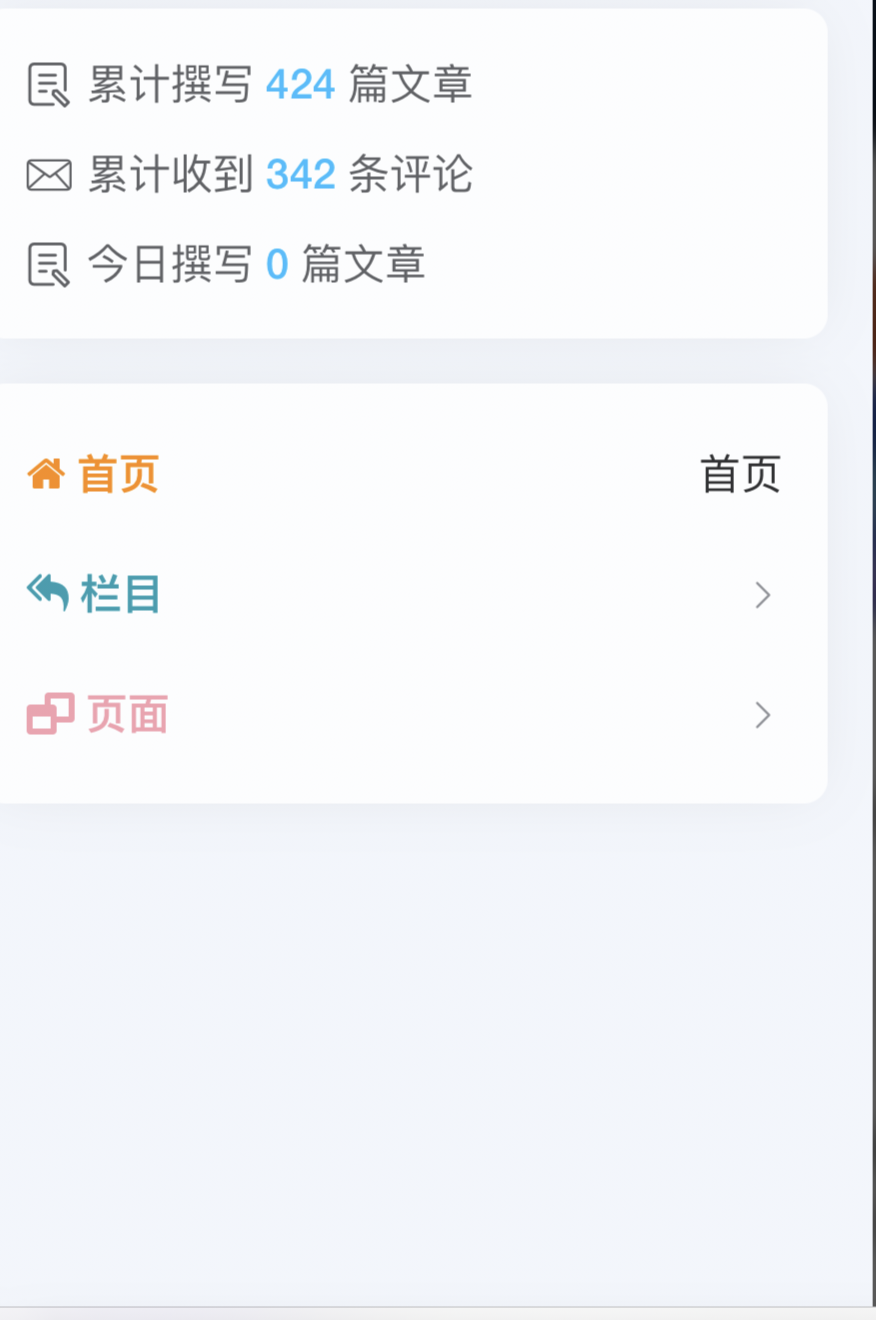
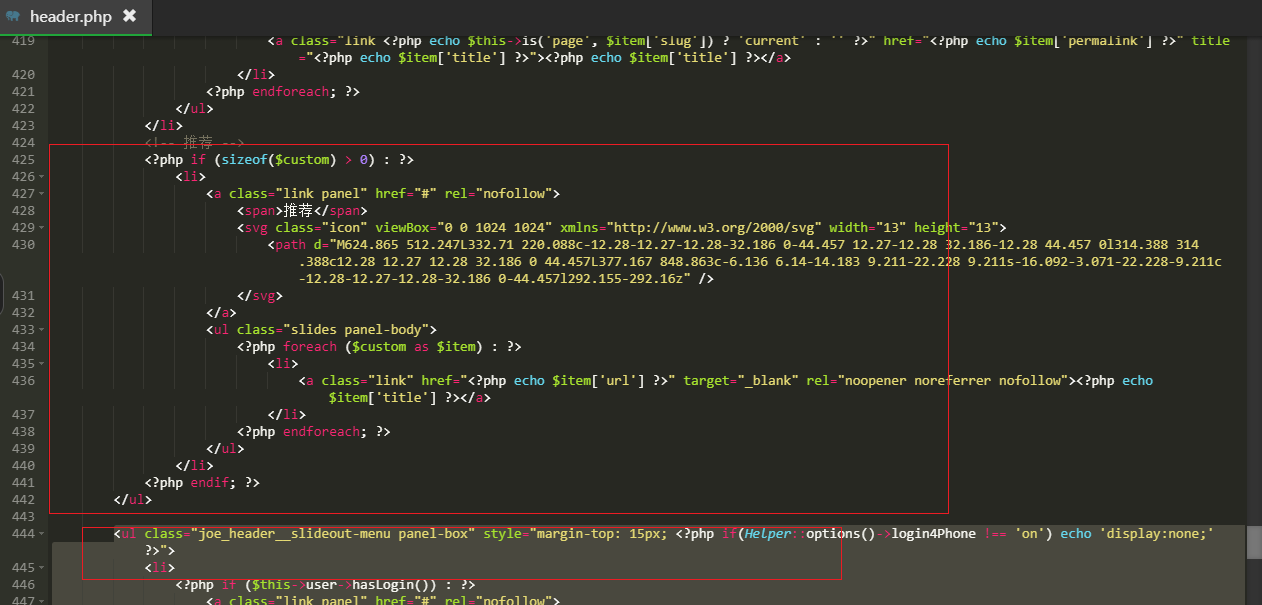
Typecho-joe主题手机侧边栏加图标颜色 1.修改教程,路径/Joe/public/header.php修改首页,官版327行。<span><font color="#ff8900" style="font-weight:600;"> <i class="fa fa-home"></i> 首页</font></span>2.修改栏目,用下面代码替换 <span>栏目</span><span><font color="0909f7b" style="font-weight:600;"> <i class="fa fa-mail-reply-all"></i> 栏目</font></span>3.页面<span><font color="#f709f7b" style="font-weight:600;"> <i class="fa fa-window-restore"></i> 页面</font></span>4.推荐<span><font color="#66ff00b" style="font-weight:600;"> <i class="fa fa-thumbs-o-up"></i> 推荐</font></span>
-
typecho-joe主题添加手机端公告 添加后效果添加手机端代码位置:/usr/themes/Joe/public/header.php在 310 行处添加改代码即可即在以下代码后添加<div class="joe_header__slideout-author"> <img width="50" height="50" class="avatar lazyload" src="<?php _getAvatarLazyload(); ?>" data-src="<?php $this->options->JAside_Author_Avatar ? $this->options->JAside_Author_Avatar() : _getAvatarByMail($this->authorId ? $this->author->mail : $this->user->mail) ?>" alt="博主昵称" /> <div class="info"> <a class="link" href="<?php $this->options->JAside_Author_Link() ?>" target="_blank" rel="noopener noreferrer nofollow"><?php $this->options->JAside_Author_Nick ? $this->options->JAside_Author_Nick() : ($this->authorId ? $this->author->screenName() : $this->user->screenName()); ?></a> <p class="motto joe_motto"></p> </div> </div>添加手机端代码:<div class = item style="height:30px"> <svg viewBox="0 0 1024 1024" xmlns="http://www.w3.org/2000/svg" width="20" height="20"> <path d="M656.261 347.208a188.652 188.652 0 1 0 0 324.05v-324.05z" fill="#F4CA1C"></path> <path d="M668.35 118.881a73.35 73.35 0 0 0-71.169-4.06l-310.01 148.68a4.608 4.608 0 0 1-2.013.46h-155.11a73.728 73.728 0 0 0-73.728 73.636v349.64a73.728 73.728 0 0 0 73.728 73.636h156.554a4.68 4.68 0 0 1 1.94.43l309.592 143.196a73.702 73.702 0 0 0 104.668-66.82V181.206a73.216 73.216 0 0 0-34.453-62.326zM125.403 687.237v-349.64a4.608 4.608 0 0 1 4.608-4.608h122.035v358.882H130.048a4.608 4.608 0 0 1-4.644-4.634zm508.319 150.441a4.608 4.608 0 0 1-6.564 4.193L321.132 700.32V323.773l305.97-146.723a4.608 4.608 0 0 1 6.62 4.157v656.471zM938.26 478.72H788.01a34.509 34.509 0 1 0 0 69.018H938.26a34.509 34.509 0 1 0 0-69.018zM810.01 360.96a34.447 34.447 0 0 0 24.417-10.102l106.245-106.122a34.524 34.524 0 0 0-48.84-48.809L785.587 302.08a34.509 34.509 0 0 0 24.423 58.88zm24.417 314.609a34.524 34.524 0 1 0-48.84 48.814L891.832 830.52a34.524 34.524 0 0 0 48.84-48.809z" fill="#595BB3"></path> </svg> <a href="https://yumuing.top/" target="_blank" rel="noopener noreferrer nofollow"display: inline-block;>网安备案!关闭本站评论功能!</a> </div>
-
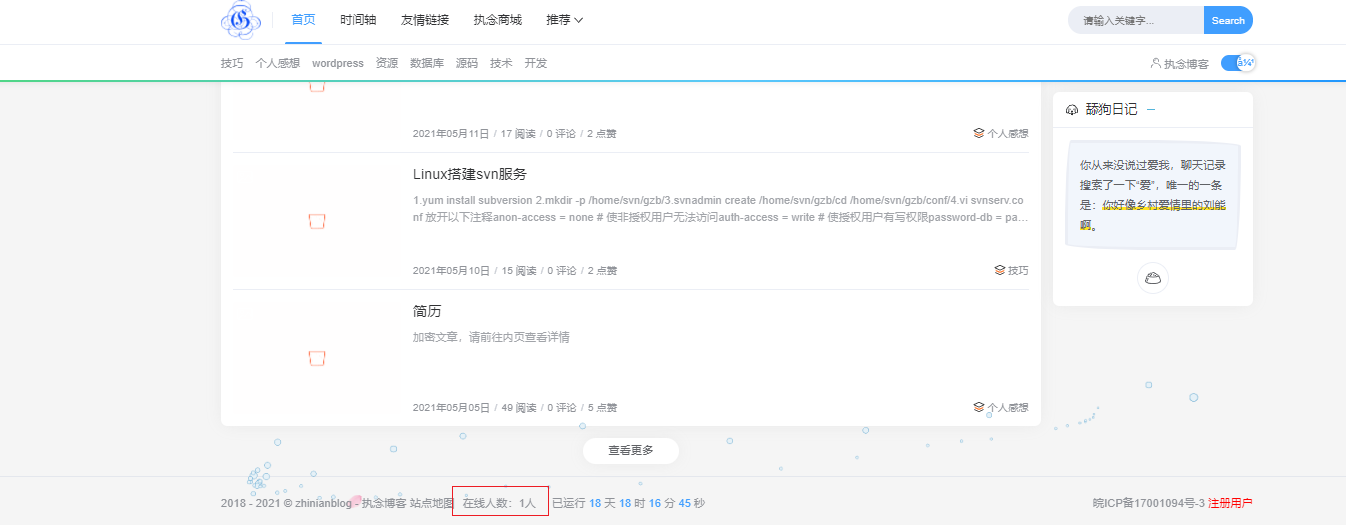
Typecho-Joe主题新增在线人数统计功能 成品如图1.修改functions.php,底部新增,文件路径:usr/themes/Joe;如果无法显示设置,则将以下joe_custom修改为joe_other// 在线人数设置 $onlinePersion = new Typecho_Widget_Helper_Form_Element_Select( 'onlinePersion', array( 'on' => '开启(默认)', 'off' => '关闭', ), 'on', '是否启用在线人数统计', '介绍:开启后,文章底部展示当前在线人数' ); $onlinePersion->setAttribute('class', 'joe_content joe_custom'); $form->addInput($onlinePersion->multiMode());2.修改footer.php文件,文件路径:/usr/themes/Joe/public①第一段,顶部新增<?php //首先你要有读写文件的权限,首次访问不显示,正常情况刷新即可 $online_log = "slzxrs.dat"; //保存人数的文件到根目录, $timeout = 30;//30秒内没动作者,认为掉线 $entries = file($online_log); $temp = array(); for ($i=0;$i<count($entries);$i++){ $entry = explode(",",trim($entries[$i])); if(($entry[0] != getenv('REMOTE_ADDR')) && ($entry[1] > time())) { array_push($temp,$entry[0].",".$entry[1]."\n"); //取出其他浏览者的信息,并去掉超时者,保存进$temp } } array_push($temp,getenv('REMOTE_ADDR').",".(time() + ($timeout))."\n"); //更新浏览者的时间 $slzxrs = count($temp); //计算在线人数 $entries = implode("",$temp); //写入文件 $fp = fopen($online_log,"w"); flock($fp,LOCK_EX); //flock() 不能在NFS以及其他的一些网络文件系统中正常工作 fputs($fp,$entries); flock($fp,LOCK_UN); fclose($fp); $tj= "在线人数:".$slzxrs."人"; ?>②第二段,中间新增<div class="item" style="margin: 10px; <?php if(Helper::options()->onlinePersion !== 'on') echo 'display:none;' ?>"> <?php echo $tj ?> </div>
-
Typecho-Joe主题实现手机端登录/注册功能 1.修改header.php文件,新增代码,文件路径:usr/themes/Joe/public<ul class="joe_header__slideout-menu panel-box" style="margin-top: 15px; <?php if(Helper::options()->login4Phone !== 'on') echo 'display:none;' ?>"> <li> <?php if ($this->user->hasLogin()) : ?> <a class="link panel" href="#" rel="nofollow"> <span><?php $this->user->screenName(); ?></span> <svg class="icon" viewBox="0 0 1024 1024" xmlns="http://www.w3.org/2000/svg" width="15" height="15"> <path d="M231.594 610.125C135.087 687.619 71.378 804.28 64.59 935.994c-.373 7.25 3.89 23.307 30.113 23.307s33.512-16.06 33.948-23.301c6.861-114.025 63.513-214.622 148.5-280.346 3.626-2.804 16.543-17.618 3.24-39.449-13.702-22.483-40.863-12.453-48.798-6.08zm280.112-98.44v63.96c204.109 0 370.994 159.345 383.06 360.421.432 7.219 8.649 23.347 32.44 23.347s31.991-16.117 31.62-23.342c-12.14-236.422-207.676-424.386-447.12-424.386z" /> <path d="M319.824 319.804c0-105.974 85.909-191.883 191.882-191.883s191.883 85.91 191.883 191.883c0 26.57-5.405 51.88-15.171 74.887-5.526 14.809-2.082 31.921 20.398 38.345 23.876 6.822 36.732-8.472 41.44-20.583 11.167-28.729 17.294-59.973 17.294-92.65 0-141.297-114.545-255.842-255.843-255.842S255.863 178.506 255.863 319.804s114.545 255.843 255.843 255.843v-63.961c-105.973-.001-191.882-85.909-191.882-191.882z" /> <path d="M512 255.843s21.49-5.723 21.49-31.306S512 191.882 512 191.882c-70.65 0-127.921 57.273-127.921 127.922 0 3.322.126 6.615.375 9.875.264 3.454 14.94 18.116 37.044 14.425 22.025-3.679 26.6-21.93 26.6-21.93-.028-.788-.06-1.575-.06-2.37.001-35.325 28.637-63.961 63.962-63.961z" /> </svg> </a> <ul class="slides panel-body"> <li> <?php if ($this->user->group == 'administrator' || $this->user->group == 'editor' || $this->user->group == 'contributor') : ?> <a class="link" rel="noopener noreferrer nofollow" target="_blank" href="<?php $this->options->adminUrl("write-post.php"); ?>">撰写新文章</a> <?php endif; ?> </li> <li> <?php if ($this->user->group == 'administrator' || $this->user->group == 'editor' || $this->user->group == 'contributor') : ?> <a class="link" rel="noopener noreferrer nofollow" target="_blank" href="<?php $this->options->adminUrl("manage-posts.php"); ?>">管理文章</a> <?php endif; ?> </li> <li> <?php if ($this->user->group == 'administrator' || $this->user->group == 'editor') : ?> <a class="link" rel="noopener noreferrer nofollow" target="_blank" href="<?php $this->options->adminUrl("manage-comments.php"); ?>">管理评论</a> <?php endif; ?> </li> <li> <?php if ($this->user->group == 'administrator') : ?> <a class="link" rel="noopener noreferrer nofollow" target="_blank" href="<?php $this->options->adminUrl("options-theme.php"); ?>">修改外观</a> <?php endif; ?> </li> <li> <a class="link" rel="noopener noreferrer nofollow" target="_blank" href="<?php $this->options->adminUrl(); ?>">进入后台</a> </li> <li> <a class="link" rel="noopener noreferrer nofollow" href="<?php $this->options->logoutUrl(); ?>">退出登录</a> </li> </ul> <?php else : ?> <a class="link panel" href="#" rel="nofollow"> <span>用户登录</span> <svg class="icon" viewBox="0 0 1024 1024" xmlns="http://www.w3.org/2000/svg" width="15" height="15"> <path d="M231.594 610.125C135.087 687.619 71.378 804.28 64.59 935.994c-.373 7.25 3.89 23.307 30.113 23.307s33.512-16.06 33.948-23.301c6.861-114.025 63.513-214.622 148.5-280.346 3.626-2.804 16.543-17.618 3.24-39.449-13.702-22.483-40.863-12.453-48.798-6.08zm280.112-98.44v63.96c204.109 0 370.994 159.345 383.06 360.421.432 7.219 8.649 23.347 32.44 23.347s31.991-16.117 31.62-23.342c-12.14-236.422-207.676-424.386-447.12-424.386z" /> <path d="M319.824 319.804c0-105.974 85.909-191.883 191.882-191.883s191.883 85.91 191.883 191.883c0 26.57-5.405 51.88-15.171 74.887-5.526 14.809-2.082 31.921 20.398 38.345 23.876 6.822 36.732-8.472 41.44-20.583 11.167-28.729 17.294-59.973 17.294-92.65 0-141.297-114.545-255.842-255.843-255.842S255.863 178.506 255.863 319.804s114.545 255.843 255.843 255.843v-63.961c-105.973-.001-191.882-85.909-191.882-191.882z" /> <path d="M512 255.843s21.49-5.723 21.49-31.306S512 191.882 512 191.882c-70.65 0-127.921 57.273-127.921 127.922 0 3.322.126 6.615.375 9.875.264 3.454 14.94 18.116 37.044 14.425 22.025-3.679 26.6-21.93 26.6-21.93-.028-.788-.06-1.575-.06-2.37.001-35.325 28.637-63.961 63.962-63.961z" /> </svg> </a> <ul class="slides panel-body"> <li> <a class="link" href="<?php $this->options->adminUrl('login.php'); ?>" target="_blank" rel="noopener noreferrer nofollow">登录</a> <?php if ($this->options->allowRegister) : ?> <a class="link" href="<?php $this->options->adminUrl('register.php'); ?>" target="_blank" rel="noopener noreferrer nofollow">注册</a> <?php endif; ?> </li> </ul> <?php endif; ?> </li> </ul>放在ul后面2.修改functions.php,最后新增,文件路径:usr/themes/Joe// 手机端登录 $login4Phone = new Typecho_Widget_Helper_Form_Element_Select( 'login4Phone', array( 'off' => '关闭(默认)', 'on' => '开启', ), 'on', '是否启用手机端登录功能', '介绍:开启后,手机端侧边栏将展示登录功能和登录后的操作' ); $login4Phone->setAttribute('class', 'joe_content joe_custom'); // 如果无法展示,则将joe_custom替换为joe_other $form->addInput($login4Phone->multiMode());
-
typecho-joe主题添加音乐分享 歌单播放{music-list id="8904187604" color="#1989fa" autoplay="autoplay"/}单曲播放{music id="192251" color="#00ffff" autoplay="autoplay"/}音乐搜索音乐地址 作者原地址失效了,所以替换播放插件地址就行了。,主要替换两个地方这是歌单 /usr/themes/Joe/assets/js/joe.short.min.js这是单曲 /usr/themes/Joe/assets/js/joe.short.js修改方法是用:https://www.nmssb.cn/usr/themes/Joe/163musicapi.php?id=(借用笔记堡地址)替换掉https://www.vvhan.com/usr/themes/Joe/NeteaseCloudMusicApi.php?id=(原作者地址)就好了也可以把附件里面的NeteaseCloudMusicApi.php,放在自己网站,然后修改地址为自己的网站地址。{cloud title="音乐文件" type="lz" url="https://hndy8.lanzoub.com/iPprk2y4komh" password="77mu"/}