搜索到
28
篇与
随手记
的结果
-
 ubuntu20.04安装typecho 一、安装基础支撑环境安装nginxsudo apt install nginx安装mysql安装命令如下sudo apt install mysql-server # 安装mysql systemctl status mysql # 确认mysql状态进行mysql安全配置sudo mysql_secure_installation # 进行安全配置 -----------------------参照以下输入即可完成设置--------------------- Press y|Y for Yes, any other key for No: y Please enter 0 = LOW, 1 = MEDIUM and 2 = STRONG: 2 Do you wish to continue with the password provided?(Press y|Y for Yes, any other key for No) : y Remove anonymous users? (Press y|Y for Yes, any other key for No) : y Disallow root login remotely? (Press y|Y for Yes, any other key for No) : y Remove test database and access to it? (Press y|Y for Yes, any other key for No) : y Reload privilege tables now? (Press y|Y for Yes, any other key for No) : y安装phpsudo apt install php-fpm sudo apt install php-mysql sudo apt install php-mbstring二、配置nginx创建ssl文件夹并放入ssl证书cd /etc/nginx/ mkdir ssl mv /tmp/ssl/* . # 将fullchain.crt和private.pem移动/复制到此文件夹下修改nginx配置cd /etc/nginx/sites-available sudo vi blog # 参考下方配置内容 ln -s /etc/nginx/sites-available/blog /etc/nginx/sites-enabled/. # 创建链接nginx配置如下server { listen 443 ssl http2; server_name your_domain; ssl_certificate /etc/nginx/ssl/fullchain.crt; ssl_certificate_key /etc/nginx/ssl/private.pem; ssl_session_timeout 1d; ssl_session_cache shared:MozSSL:10m; ssl_session_tickets off; ssl_protocols TLSv1.2 ; ssl_ciphers ECDHE-ECDSA-AES128-GCM-SHA256:ECDHE-RSA-AES128-GCM-SHA256:ECDHE-ECDSA-AES256-GCM-SHA384:ECDHE-RSA-AES256-GCM-SHA384:ECDHE-ECDSA-CHACHA20-POLY1305:ECDHE-RSA-CHACHA20-POLY1305:DHE-RSA-AES128-GCM-SHA256:DHE-RSA-AES256-GCM-SHA384; ssl_prefer_server_ciphers off; # 开启OCSP stapling ssl_stapling on; ssl_stapling_verify on; root /var/www/html/typecho; # 与实际对应上 index index.php index.html index.htm default.php default.htm default.html; fastcgi_temp_file_write_size 10m; fastcgi_busy_buffers_size 512k; fastcgi_buffer_size 512k; fastcgi_buffers 16 512k; location / { try_files $uri $uri/ /index.php$is_args$args; } location ~ [^/]\.php(/|$) { include snippets/fastcgi-php.conf; fastcgi_pass unix:/run/php/php7.4-fpm.sock; # 该路径需要与实际对应上 } location ~ .*\.(gif|jpg|jpeg|png|bmp|swf)$ { expires 30d; error_log /dev/null; access_log /dev/null; } location ~ .*\.(js|css)?$ { expires 12h; error_log /dev/null; access_log /dev/null; } }将typecho.zip放入/var/www/html并解压,同时修改文件权限sudo mkdir /var/www/html/typecho sudo mv /tmp/typecho.zip /var/www/html/. sudo unzip /var/www/html/typecho.zip /var/www/html/typecho sudo chmod -R 777 /var/www/html/typecho/usr/uploads/三、创建数据库及用户创建typecho数据库及管理用户并授权create database typecho; create user 'typechoadmin'@'localhost' identified by 'your_password!'; grant all on typecho.* to 'typechoadmin'@'localhost'; flush privileges;四、安装typecho{alert type="info"}访问网站首页,按提示输入数据库账号密码等相关信息,安装typecho{/alert}
 -
王阳明:修炼自己(深度好文) 孔子之后,世上还有没有旷世圣哲?{lamp/} 有,王阳明。清朝名臣王士祯直言,立德、立功、立言,阳明皆居绝顶。 他是明朝状元王华之子,以一己之力实现了古今圣贤的最高人格理想,被誉为“千古第一完人”。直至今天,他提出的“知行合一”“心即理”“致良知”的学说,500年后的我们读来,仍然醍醐灌顶、茅塞顿开。 读过王阳明的人,无不慨叹:人生缘何不快乐,只因未读王阳明。 为人不识王阳明,阅尽群书也枉然。 人生若懂王阳明,命运之路更顺畅。 如果你正处于从人生低谷中,想一脚踏出命运的泥沼,那么我强烈推荐你要好好读一读王阳明。 每个被鸡零狗碎的日常生活折磨的人,都能从王阳明身上重拾自己内心的力量,终究活得淡然通透。读懂王阳明改变一生命运 可能很多人都不知道,王阳明生来就是一个资质平平的普通人。在5岁的时候,都还不会说话,简直就是妥妥的输在了起跑线;等到年轻时参加科举,接连两次都是惨遭落榜,属于得靠勤勉才能补足差距的类型;好不容易通过科举,却又接二连三遭遇被贬、流放、追杀…… 就说,这样的王阳明惨不惨?可是,当你翻开他的履历表,你又会被震惊到!他的头衔多到吓人:思想家、哲学家、文学家、书法家、政治家、军事家、教育家、心理学家……历史上能集齐这么多头衔的人,屈指可数。论哲学,王阳明是“心学”的集大成者,万人敬仰的一代宗师;论教育,王阳明门徒众多,弟子及再传弟子中能人辈出,有的甚至当上了明朝首相;论军事,王阳明仅用42天,就平定了声势浩大的宁王叛乱,一介文官竟因军功被封侯,古今罕有,还被日本人列入“中国历代100名将”; 他还是中国历史上唯二做到“立功立言立德”三不朽的完美圣贤,第一个是孔子。 为什么,一个平平无奇的普通小孩,能摇身一变成为一代宗师? 这背后的秘籍,便就是影响中国近500年的“王阳明心学”了。从诞生开始,它就具备了一种对抗命运的的特别属性。王阳明心学传入日本,很快被日本武士们接受。而在今天,王阳明心学已经成为国内不少企业家的研读课程。每一句都是王阳明掏心窝子的实话,值得我们不断体味、修炼、成长。阳明心理学风靡中日500年 总有大聪明会说,古人的思想都落伍啦,没必要看啦。这句话如果放在其他人身上,可能正确。但放在王阳明身上,大错特错。如果你真正翻开《王阳明全书》,你会发现,500年过去了,他的“心学”并没有陈腐过时,反而处处都是现代价值的体现,闪耀着现代的光芒。说句不好听的,我们很多现代人,还根本没有做到。关于学习,王阳明提倡"知行合一",翻译过来就是: 实践出真知。你觉得你懂了,其实你并没有真正搞懂,要在“做”中去进行学习。如果能早一点懂得这个道理,就会早一点摆脱眼高手低、好高骛远的毛病,让自己能在踏踏实实中做出一番事出来。 关于做人,王阳明说要 "致良知" 。翻译一下就是说: 做人,要有点基本的是非之心。如果能早一点懂得这个道理,不管社会再浮躁、诱惑再多,也能让自己坚持本心,不走弯路。 关于做事,王阳明提倡 “唯求其是” 这是指: 看问题做事,都要实事求是,容不得半点虚假。如果能早一点懂得这个道理,就会炼就一双火眼金睛,不管周遭充斥着再多的谎言,也能认清真相与事实。就说这些智慧,是不是一点都没有过时?在500年后的今天,依旧如此适用! 在王阳明看来,教育孩子的核心就是立志修德,重要的不是个人的事业前途,而是生而为人的品德修养。但凡一个家长能够领悟到这篇家训的大智慧,那么教育出来的孩子肯定都会特别优秀。当你把这套书读上三遍之后,你会发现曾经觉得很难过去的坎,竟然都变成了不值一提的小事了……{lamp/}推荐大家可以去读一读这本书,随手一翻就能找到很多关于修身养性、交友处事、成长修炼的道理,每一条都够让你幡然醒悟。
-
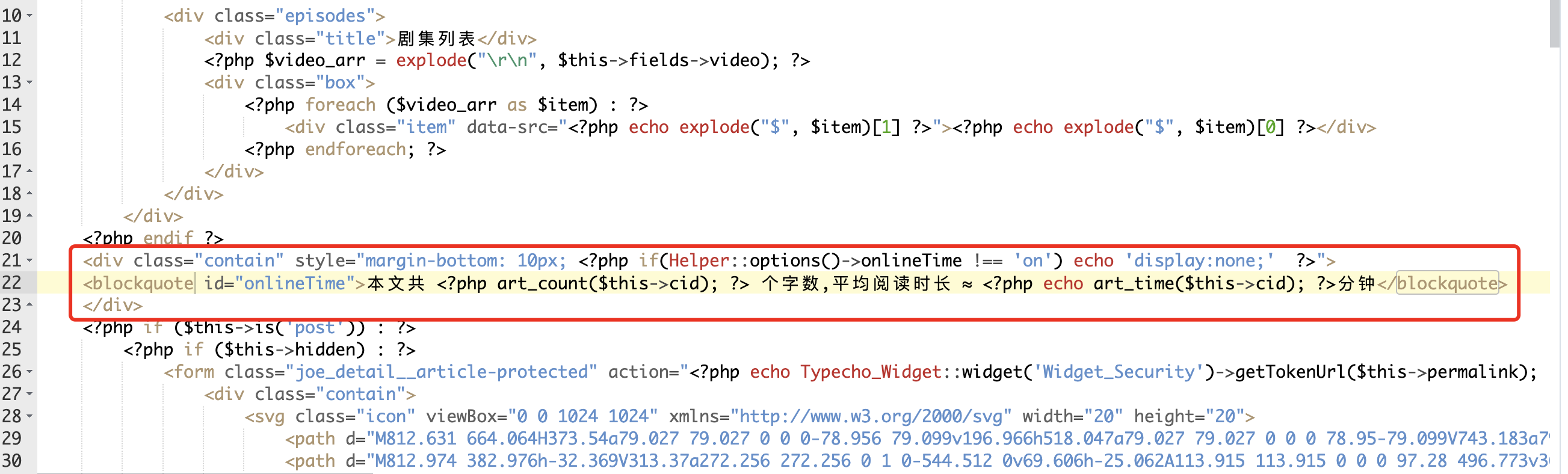
typecho主题joe添加文章阅读时长统计 步骤:修改functions.php添加选项;添加字数统计和阅读时长函数;改article.php显示信息;添加JavaScript计时器;调整CSS样式;测试功能。需要详细说明每个步骤,并给出代码示例,同时提供注意事项和常见问题。在 Typecho Joe 主题 中添加 文章阅读时长统计功能(包括文章字数、预计阅读时间、实际阅读时长),可以通过以下步骤实现:步骤 1:修改 functions.php 文件打开文件: 进入 Joe 主题目录(路径为 /usr/themes/Joe/functions.php),找到并打开 functions.php 文件。添加选项设置: 在文件底部(或合适的位置)添加以下代码,用于控制是否开启阅读时长统计功能:// 阅读时长统计设置 $onlineTime = new Typecho_Widget_Helper_Form_Element_Select( 'onlineTime', array( 'off' => '关闭(默认)', 'on' => '开启' ), 'on', '是否启用文章阅读时长统计', '介绍:开启后,文章底部展示文章字数,预计阅读时长和已阅读时长' ); $onlineTime->setAttribute('class', 'joe_content joe_other'); $form->addInput($onlineTime->multiMode());保存文件: 保存 functions.php 的修改。步骤 2:添加字数统计和阅读时长函数在 functions.php 中添加函数: 在 functions.php 文件中添加以下代码(建议放在 functions.php 底部):// 文章字数统计 function art_count($cid) { $db = Typecho_Db::get(); $rs = $db->fetchRow($db->select('table.contents.text')->from('table.contents')->where('table.contents.cid=?', $cid)->order('table.contents.cid', Typecho_Db::SORT_ASC)->limit(1)); $text = preg_replace("/[^\x{4e00}-\x{9fa5}]/u", "", $rs['text']); echo mb_strlen($text, 'UTF-8'); } // 预计阅读时长计算(按每分钟400字) function art_time($cid) { $db = Typecho_Db::get(); $rs = $db->fetchRow($db->select('table.contents.text')->from('table.contents')->where('table.contents.cid=?', $cid)->order('table.contents.cid', Typecho_Db::SORT_ASC)->limit(1)); $text = preg_replace("/[^\x{4e00}-\x{9fa5}]/u", "", $rs['text']); $text_word = mb_strlen($text, 'UTF-8'); echo ceil($text_word / 400); }保存文件: 保存 functions.php 的修改。步骤 3:修改 article.php 文件打开文件: 进入 Joe 主题目录(路径为 /usr/themes/Joe/article.php 或 /usr/themes/Joe/public/article.php),找到并打开 article.php 文件。添加显示代码: 在文章底部(例如 <div class="joe_article__footer"> 内部)添加以下代码:<div class="contain" style="margin-bottom: 10px; <?php if(Helper::options()->onlineTime !== 'on') echo 'display:none;' ?>"> <blockquote id="onlineTime"> 本文共 <?php art_count($this->cid); ?> 个字,平均阅读时长 ≈ <?php echo art_time($this->cid); ?> 分钟 </blockquote> </div>添加 JavaScript 计时器: 在 </body> 标签前添加以下 JavaScript 代码(用于统计实际阅读时长):<script> var second = 0; var minute = 0; var hour = 0; window.setTimeout("interval();", 1000); function interval() { second++; if (second == 60) { second = 0; minute += 1; } if (minute == 60) { minute = 0; hour += 1; } // 显示实际阅读时长(示例:仅显示分钟和秒) document.getElementById("onlineTime").innerHTML += " | 已阅读 " + minute + " 分 " + second + " 秒"; } </script>保存文件: 保存 article.php 的修改。步骤 4:调整样式(可选)添加 CSS 样式: 如果希望美化显示效果,可以在 functions.php 或主题的 CSS 文件中添加以下样式:#onlineTime { font-size: 0.9em; color: #666; margin-top: 10px; padding: 5px; background: #f9f9f9; border-left: 4px solid #0073aa; }步骤 5:测试刷新网站: 打开你的 Typecho 网站,查看文章页面是否显示字数、预计阅读时间和实际阅读时长。检查后台设置: 进入 Typecho 后台 → 控制台 → 设置 → 主题设置,确保 onlineTime 选项已开启。
-
为你的网站添加点击散开特效 将以下代码复制到你网站最底部即可实现<canvas id="fireworks" style="position: fixed; left: 0px; top: 0px; pointer-events: none; z-index: 2147483647; width: 1920px; height: 151px;" width="3840" height="302"></canvas> <script type="text/javascript" src="https://cdn.jsdelivr.net/npm/animejs@3.0.1/lib/anime.min.js"></script> <script type="text/javascript"> function updateCoords(e) { pointerX = (e.clientX || e.touches[0].clientX) - canvasEl.getBoundingClientRect().left, pointerY = e.clientY || e.touches[0].clientY - canvasEl.getBoundingClientRect().top } function setParticuleDirection(e) { var t = anime.random(0, 360) * Math.PI / 180, a = anime.random(50, 180), n = [-1, 1][anime.random(0, 1)] * a; return { x: e.x + n * Math.cos(t), y: e.y + n * Math.sin(t) } } function createParticule(e, t) { var a = {}; return a.x = e, a.y = t, a.color = colors[anime.random(0, colors.length - 1)], a.radius = anime.random(16, 32), a.endPos = setParticuleDirection(a), a.draw = function() { ctx.beginPath(), ctx.arc(a.x, a.y, a.radius, 0, 2 * Math.PI, !0), ctx.fillStyle = a.color, ctx.fill() }, a } function createCircle(e, t) { var a = {}; return a.x = e, a.y = t, a.color = "#F00", a.radius = .1, a.alpha = .5, a.lineWidth = 6, a.draw = function() { ctx.globalAlpha = a.alpha, ctx.beginPath(), ctx.arc(a.x, a.y, a.radius, 0, 2 * Math.PI, !0), ctx.lineWidth = a.lineWidth, ctx.strokeStyle = a.color, ctx.stroke(), ctx.globalAlpha = 1 }, a } function renderParticule(e) { for (var t = 0; t < e.animatables.length; t++) e.animatables[t].target.draw() } function animateParticules(e, t) { for (var a = createCircle(e, t), n = [], i = 0; i < numberOfParticules; i++) n.push(createParticule(e, t)); anime.timeline().add({ targets: n, x: function(e) { return e.endPos.x }, y: function(e) { return e.endPos.y }, radius: .1, duration: anime.random(1200, 1800), easing: "easeOutExpo", update: renderParticule }).add({ targets: a, radius: anime.random(80, 160), lineWidth: 0, alpha: { value: 0, easing: "linear", duration: anime.random(600, 800) }, duration: anime.random(1200, 1800), easing: "easeOutExpo", update: renderParticule, offset: 0 }) } function debounce(fn, delay) { var timer return function() { var context = this var args = arguments clearTimeout(timer) timer = setTimeout(function() { fn.apply(context, args) }, delay) } } var canvasEl = document.querySelector("#fireworks"); if (canvasEl) { var ctx = canvasEl.getContext("2d"), numberOfParticules = 30, pointerX = 0, pointerY = 0, tap = "mousedown", colors = ["#FF1461", "#18FF92", "#5A87FF", "#FBF38C"], setCanvasSize = debounce(function() { canvasEl.width = 2 * window.innerWidth, canvasEl.height = 2 * window.innerHeight, canvasEl.style.width = window.innerWidth + "px", canvasEl.style.height = window.innerHeight + "px", canvasEl.getContext("2d").scale(2, 2) }, 500), render = anime({ duration: 1 / 0, update: function() { ctx.clearRect(0, 0, canvasEl.width, canvasEl.height) } }); document.addEventListener(tap, function(e) { "sidebar" !== e.target.id && "toggle-sidebar" !== e.target.id && "A" !== e.target.nodeName && "IMG" !== e.target.nodeName && (render.play(), updateCoords(e), animateParticules(pointerX, pointerY)) }, !1), setCanvasSize(), window.addEventListener("resize", setCanvasSize, !1) } </script>
-
Typecho开发主题常用函数及调用方法 1、站点名称<?php $this->options->title() ?>2、站点网址<?php $this->options ->siteUrl(); ?>3、完整路径<?php $this->archiveTitle(' » ', < span class="string">'', ' | '); ?><?php $this ->options->title(); ?>4、站点说明<?php $this->options->description() ?>5、模板文件夹地址<?php $this->options->themeUrl(); ?>6、导入模板文件夹内的 php 文件<?php $this->need('.php'); ?>7、文章或者页面的作者<?php $this->author(); ?>8、作者头像< ?php $this->author->gravatar('40') ?> //此处输出的完整的img标签,40是头像的宽和高9、该文作者全部文章列表链接<?php $this->author->permalink (); ?>10、该文作者个人主页链接<?php $this->author->url(); ?>11 、该文作者的邮箱地址<?php $this->author->mail(); ?>12、上一篇与下一篇调用代码<?php $this->thePrev(); ?> <?php $this->theNext(); ?>13、判断是否为首页,输出相关内容<?php if ($this->is('index')): ?> //首页输出内容 <?php else: ?> //不是首页输出内容 <?php endif; ?>14、文章或页面,评论数目<?php $this->commentsNum('No Comments', '1 Comment' , '%d Comments'); ?>15、截取部份文章(首页每篇文章显示摘要),350 是字数<?php $this->excerpt(350, '...'); ?>16、调用自定义字段<?php $this->fields->fieldName ?>17、RSS 地址<?php $this->options->feedUrl(); ?>18、获取最新 post<?php $this->widget('Widget_Contents_Post_Recent', 'pageSize=8&type=category')->parse('<li><a href="{permalink}">{title}</a></li>'); ?>19、纯文字分类名称,不带链接<?php $this->category(',', false); ?>20、获取当前文章所属分类(包含链接)<?php if ($this->is('post')): ?> <span><?php $this->category(' '); ?></span> <?php endif; ?>21、获取文章分类列表<ul> <?php $this->widget('Widget_Metas_Category_List') ->parse('<li><a href="{permalink}">{name}</a> ({count})</li>'); ?> </ul>22、获取某分类 post<ul> <?php $this->widget('Widget_Archive@indexyc', 'pageSize=8&type=category', 'mid=1') ->parse('<li><a href="{permalink}" title="{title}">{title}</a></li>'); ?> </ul>23、获取最新评论列表<ul> <?php $this->widget('Widget_Comments_Recent')->to($comments); ?> <?php while($comments->next()): ?> <li><a href="<?php $comments->permalink(); ?>"><?php $comments->author(false); ?></a>: <?php $comments->excerpt(50, '...'); ?></li> <?php endwhile; ?> </ul>24、首页获取 最新文章 代码限制条数<?php while ($this->next()): ?> <?php if ($this->sequence <= 3): ?> html <?php endif; ?> <?php endwhile; ?>25、获取最新评论列表第二个版本,只显示访客评论不显示博主也就是作者或者说自己发的评论<?php $this->widget('Widget_Comments_Recent','ignoreAuthor=true')->to($comments); ?> <?php while($comments->next()): ?> <li><a href="<?php $comments->permalink(); ?>"><?php $comments->author(false); ?></a>: <?php $comments->excerpt(50, '...'); ?></li> <?php endwhile; ?>26、获取文章时间归档<ul> <?php $this->widget('Widget_Contents_Post_Date', 'type=month&format=F Y') ->parse('<li><a href="{permalink}">{date}</a></li>'); ?> </ul>27、获取标签集合,也就是标签云<?php $this->widget('Widget_Metas_Tag_Cloud', 'ignoreZeroCount=1&limit=28')->to($tags); ?> <?php while($tags->next()): ?> <a href="<?php $tags->permalink(); ?>" class="size-<?php $tags->split(5, 10, 20, 30); ?>"><?php $tags->name(); ?></a> <?php endwhile; ?>28、调用该文相关文章列表<?php $this->related(5)->to($relatedPosts); ?> <?php if ($relatedPosts->have()): ?> //这句也可以写成 if (count($relatedPosts->stack)) <ul><?php while ($relatedPosts->next()): ?> <li><a href="<?php $relatedPosts->permalink(); ?>" title="<?php $relatedPosts->title(); ?>"><?php $relatedPosts->title(); ?></a></li> <?php endwhile; ?></ul> <?php else : ?> <li>无相关文章</li> <?php endif; ?>29、隐藏 head 区域的程序版本和模版名称<?php $this->header("generator=&template="); ?>30、获取读者墙<?php $period = time() - 999592000; // 時段: 30 天, 單位: 秒 $counts = Typecho_Db::get()->fetchAll(Typecho_Db::get() ->select('COUNT(author) AS cnt','author', 'url', 'mail') ->from('table.comments') ->where('created > ?', $period ) ->where('status = ?', 'approved') ->where('type = ?', 'comment') ->where('authorId = ?', '0') ->group('author') ->order('cnt', Typecho_Db::SORT_DESC) ->limit(25) ); $mostactive = ''; $avatar_path = 'http://www.gravatar.com/avatar/'; foreach ($counts as $count) { $avatar = $avatar_path . md5(strtolower($count['mail'])) . '.jpg'; $c_url = $count['url']; if ( !$c_url ) $c_url = Helper::options()->siteUrl; $mostactive .= "<a href='" . $c_url . "' title='" . $count['author'] . " (参与" . $count['cnt'] . "次互动)' target='_blank'><img src='" . $avatar . "' alt='" . $count['author'] . "的头像' class='avatar' width='32' height='32' /></a>\n"; } echo $mostactive; ?>31、登陆与未登录用户展示不同内容<?php if($this->user->hasLogin()): ?> // 登陆可见 <?php else: ?> // 未登录和登陆均可见 <?php endif; ?>32、导航页面列表调用隐藏特定的页面 这个演示隐藏了 album 和 search 两个页面<ul> <li<?php if($this->is('index')): ?> class="current"<?php endif; ?>><a href="<?php $this->options->siteUrl(); ?>">主页</a></li> <?php $this->widget('Widget_Contents_Page_List')->to($pages); ?> <?php while($pages->next()): ?> <?php if (($pages->slug != 'album') && ($pages->slug != 'search')): ?> <li<?php if($this->is('page', $pages->slug)): ?> class="current"<?php endif; ?>><a href="<?php $pages->permalink(); ?>" title="<?php $pages->title(); ?>"><?php $pages->title(); ?></a></li> <?php endif; ?> <?php endwhile; ?> </ul> //参数说明:9.0 版 typecho 支出在后台管理页面编辑时选择隐藏页面。33、Typecho 归档页面 (牧风提供)<?php $this->widget('Widget_Contents_Post_Recent', 'pageSize=10000')->to($archives); $year=0; $mon=0; $i=0; $j=0; $output = '<div id="archives">'; while($archives->next()): $year_tmp = date('Y',$archives->created); $mon_tmp = date('m',$archives->created); $y=$year; $m=$mon; if ($mon != $mon_tmp && $mon > 0) $output .= '</ul></li>'; if ($year != $year_tmp && $year > 0) $output .= '</ul>'; if ($year != $year_tmp) { $year = $year_tmp; $output .= '<h3 class="al_year">'. $year .' 年</h3><ul class="al_mon_list">'; //输出年份 } if ($mon != $mon_tmp) { $mon = $mon_tmp; $output .= '<li><span class="al_mon">'. $mon .' 月</span><ul class="al_post_list">'; //输出月份 } $output .= '<li>'.date('d日: ',$archives->created).'<a href="'.$archives->permalink .'">'. $archives->title .'</a> <em>('. $archives->commentsNum.')</em></li>'; //输出文章日期和标题 endwhile; $output .= '</ul></li></ul></div>'; echo $output; ?>34、获取当前文章页缩略图<?php $this->attachments(1)->attachment->url(); ?> //进行熊掌号改造的朋友请务必注意,这里所谓缩略图指的是当前文章页第一个附件地址,请确保第一个附件类型为图片。35、根据页面类型显示内容//判断是文章页则显示内容 <?php if ($this->is('post')): ?> 想要显示的内容1 <?php endif; ?> //判断是页面则显示内容 <?php if ($this->is('page', 'about')): ?> 想要显示的内容2 <?php endif; ?>
-
HiNAS海纳思使用和修改 海纳思全称是海思机顶盒NAS系统, 网站 https://www.ecoo.top/ 包含的功能很丰富, 除了常见的 Aria2, Transmission, Samba, 还集成了命令行, 网盘和笔记等. 适合想直接刷机使用, 不喜欢折腾的用户.界面外网内网刷机说明HiNAS 固件下载: https://dl.ecoo.top参考前一篇刷机部分的介绍, 以及 https://www.ecoo.top/hitool.html使用部分盒子上电, 接网线后, 通过DHCP获得IP, 此时可以通过 SSH 登录, 默认账户为 root / ecoo1234用浏览器访问盒子所在 IP, 会有使用说明和各个功能入口加硬盘后上电, 系统会字段挂载硬盘到 /mnt/sda1 分区如果加硬盘后未能自带挂载, 通过 dmesg 命令查看日志排查问题.定制部分删除web界面的浮窗浮窗比较烦人编辑 /var/www/html/index.html 找到并删除<div class="adleft"> <button onclick="">关闭</button> <a href="https://www.ecoo.top/gonggao.html" target="_blank"><img src="https://www.ecoo.top/hongbao.jpg" width="141px" height="203px" border="1" /></a> </div>修改欢迎界面欢迎界面会清除系统自带的登录输出, 如果想将其融合到系统自带的登录输出中, 可以做如下修改删除 /etc/profile.d/ 下面的两个文件在 /etc/update-motd.d/ 目录下, 创建文件 60-welcome, 并将其 chmod +x 设置为可执行文件内容如下, 如果不合适可以自己改#!/bin/sh # IP=$(ifconfig eth0 | grep '\<inet\>'| grep -v '127.0.0.1' | awk '{print $2}' | awk 'NR==1') DEVICE=$(dmesg 2> /dev/null | grep "CPU: hi3798" | awk -F ':[ ]' '/CPU/{printf ($2)}') [ ! "$DEVICE" ] && DEVICE=$(head -n 1 /etc/regname 2> /null) mac_now=$(ifconfig eth0 |grep "ether"| awk '{print $2}') echo "\e[33m __ ____ __ / / / / /_ __ ______ / /___ __ / / / / __ \/ / / / __ \/ __/ / / / / /_/ / /_/ / /_/ / / / / /_/ /_/ / \____/_.___/\__,_/_/ /_/\__/\__,_/ \e[0m Board : ${DEVICE} Module : $(egrep -oa "hi3798.+reg" /dev/mmcblk0p1| cut -d '_' -f1 | sort | uniq | tr "\\n" ",") CPU : $(cat -v /proc/device-tree/compatible |sed 's/\^@//g') @$(cat /proc/cpuinfo | grep "processor" | sort | uniq | wc -l) Cores | $(uname -p) Version : $(awk -F '[= "]' '/PRETTY_NAME/{print $3,$4,$5}' /etc/os-release) | V$(cat /etc/nasversion)-$(uname -r)-$(getconf LONG_BIT) Storage : $(df -m / | grep -v File | awk '{a=$4*100/$2;b=$4} {printf("%.1f%s %.1fM\n",a,"%",b)}') Memory : $(free -m | grep Mem | awk '{a=$7*100/$2;b=$7} {printf("%.1f%s %.1fM\n",a,"%",b)}') | Swap:$(free -m | grep Swap | awk '{a=$4*100/$2;b=$4} {printf("%.1f%s %.1fM\n",a,"%",b)}') StartAt : $(awk '{a=$1/86400;b=($1%86400)/3600;c=($1%3600)/60;d=($1%60)} {printf("%d Day %d Hour %d Minute %d Second\n",a,b,c,d)}' /proc/uptime) IP Addr : $IP Temper. : $(grep Tsensor /proc/msp/pm_cpu | awk '{print $4}')°C MAC Add : $mac_now " alias reload='. /etc/profile' alias cls='clear' alias syslog='cat /var/log/syslog' alias unmount='umount -l' alias reg="egrep -oa 'hi3798.+' /dev/mmcblk0p1 | awk '{print $1}'"删除,禁用 swap在这个小设备上开启swap意义不大, 即使在内存溢出的情况, 也不希望增加eMMC的写入.编辑 /etc/init.d/system-init.sh删除或注释掉以下内容if [ ! -f /swapfile ] then { dd if=/dev/zero of=/swapfile bs=1M count=512 chmod 600 /swapfile mkswap /swapfile swapon /swapfile } & fi grep -q '/swapfile' /etc/fstab || echo "/swapfile swap swap defaults,nofail 0 0" >> /etc/fstab编辑 /etc/fstab删除以下内容/swapfile swap swap defaults,nofail 0 0关闭swapswapoff -a删除swap文件rm /swapfile配置 Aria2假设硬盘已经挂载到 /mnt/sda1, 所以在配置中, 将路径都配置到 /mnt/sda1 下修改配置文件 /usr/local/aria2/aria2.confdir=/mnt/sda1/downloads disk-cache=16M input-file=/mnt/sda1/usr/aria2/aria2.session save-session=/mnt/sda1/usr/aria2/aria2.session dht-file-path=/mnt/sda1/usr/aria2/dht.dat dht-file-path6=/mnt/sda1/usr/aria2/dht6.dat需要手动创建一个空文件 /mnt/sda1/usr/aria2/aria2.session, 否则 aria2 会启动失败.重启 aria2 使其生效配置 Transmission配置文件在 /etc/transmission-daemon/settings.json将下载目录修改为硬盘下的目录"download-dir": "/mnt/sda1/transmission-downloads",启用 incomplete 目录"incomplete-dir": "/mnt/sda1/tmp", "incomplete-dir-enabled": true,修改前必须停止 transmission, 否则修改不会生效, 在transmission退出时会被原配置覆盖.配置 Samba配置文件在 /etc/samba/smb.conf增加一个只读的 public 目录, 设为硬盘所在路径, 用于局域网内共享[public] comment = public anonymous access path = /mnt/sda1/ browsable =yes create mask = 0600 directory mask = 0700 writable = no guest ok = yes{mtitle title="结束语"/}遇到的问题散热如果长时间运行, 放底座上竖起来, 如果没有底座, 带条码这面尽量朝上放.这个盒子设计时, 是假设直立放置在底座上工作的, 所以散热安排在其中带条码标签那面的盖板上, CPU的热量直接传到盖板上的一块金属散热片, 再通过盖板散发出去. 但是实际的使用环境, 很可能就是一个狭小的空间, 并不太可能都有底座. 这时候条码那面如果朝下, 就会导致没法散热. 如果上面还放了硬盘, 就会热上加热. 所以带条码标签的那边不要朝下放置, 除非下方是金属面, 散热很好.盒子供电能力不足这是没有意料到的一点. 这个盒子不是所有的2.5寸硬盘都能带起来.2.5寸SATA机械盘HDD的电流要求一般为0.5A, 盒子带动机械盘没什么问题. 但是对于电流要求在 0.9A 以上的 SSD 固态, 就可能会有问题. 经过测试, 可以带动所有 320G 以下的硬盘, 大部分 500GB 以下的固态, 对于 1TB 以上的固态就不一定, 尤其是电流要求为 1.7A 的镁光系列SSD固态, 无法识别, 无法初始化, 或者即使能初始化, 在读写过程中也很可能报错重置. 测试过的 闪迪ECO 1.92T 可以识别, 工作不稳定, 镁光1100 2T 不识别.系统负载一直为7.x这个是内核的问题, 内核中一直存在多个 HI_ 开头的进程, 怀疑与多媒体编解码以及加解密有关. 尚未找到关闭的方法.
-
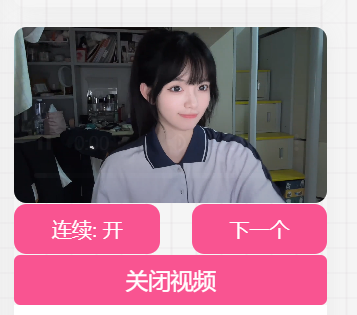
给自己网站侧边栏新增一个看视频的小组件 {tabs}{tabs-pane label="效果图"}{/tabs-pane}{tabs-pane label="源代码"}<section id="xiaojiejie"> <div class="xiaojiejie"><style>#player { margin: 1px auto; max-width: 100%; border-radius: 10px; display: block; } #xjjsp { display: none; } #ckxjj,#gbxjj { width: 100%; height: 40px; border: none; background-color: #f95491; color: #fff; margin-top: 1px; border-radius: 5px; font-size: 18px; cursor: pointer; transition: 0.2s; } #ckxjj:hover,#gbxjj:hover { background-color: #eeb4bf; } .kzsp { width: 100%; display: flex; justify-content: space-between; } .kzsp>button { border: none; height: 40px; padding: 0 30px; font-size: 16px; background-color: #f95491; border-radius: 10px; color: #fff; transition: 0.3s; cursor: pointer; } .kzsp>button:active { background-color: #e25a00; }</style> <button type="button" id="ckxjj">点我看小姐姐视频</button> <div id="xjjsp"> <video id="player" src="https://api.heylie.cn/api/video?v=emo" controls="" alt="小姐姐视频"></video> <div class="kzsp"> <button id="switch">连续: 开</button> <button id="next">下一个</button> </div> <button type="button" id="gbxjj">关闭视频</button> </div> <script> var player = document.getElementById('player'); var bind = function (element, event, callback) { return element.addEventListener(event, callback); }; var sp = 0; $(document).ready(function () { $('#ckxjj').click(() => { $('#ckxjj').hide(); $('#xjjsp').show(); if (sp == 0) { randomm(); sp = null } player.onerror = () => { randomm() } player.play(); }); $('#gbxjj').click(() => { $('#ckxjj').show(); $('#xjjsp').hide(); player.pause(); }) }); var get = function (id) { return document.getElementById(id); }; var auto = true; // 生成播放视频 function randomm() { player.src = 'https://api.heylie.cn/api/video?v=emo'; player.play(); }; bind(get('next'), 'click', randomm); bind(get('switch'), 'click', function () { auto = !auto; this.innerText = '连续:' + (auto ? '开' : '关'); }); bind(player, 'ended', function () { if (auto) randomm(); }); player.pause(); </script> </div> </section>{/tabs-pane}{/tabs}{message type="success" content="演示"/}2025-05-11 21:28:39 星期日{mtitle title="点击开始"/} #player { margin: 1px auto; max-width: 100%; border-radius: 10px; display: block; } #xjjsp { display: none; } #ckxjj,#gbxjj { width: 100%; height: 40px; border: none; background-color: #f95491; color: #fff; margin-top: 1px; border-radius: 5px; font-size: 18px; cursor: pointer; transition: 0.2s; } #ckxjj:hover,#gbxjj:hover { background-color: #eeb4bf; } .kzsp { width: 100%; display: flex; justify-content: space-between; } .kzsp>button { border: none; height: 40px; padding: 0 30px; font-size: 16px; background-color: #f95491; border-radius: 10px; color: #fff; transition: 0.3s; cursor: pointer; } .kzsp>button:active { background-color: #e25a00; } 点我看小姐姐视频 连续: 开 下一个 关闭视频 var player = document.getElementById('player'); var bind = function (element, event, callback) { return element.addEventListener(event, callback); }; var sp = 0; $(document).ready(function () { $('#ckxjj').click(() => { $('#ckxjj').hide(); $('#xjjsp').show(); if (sp == 0) { randomm(); sp = null } player.onerror = () => { randomm() } player.play(); }); $('#gbxjj').click(() => { $('#ckxjj').show(); $('#xjjsp').hide(); player.pause(); }) }); var get = function (id) { return document.getElementById(id); }; var auto = true; // 生成播放视频 function randomm() { player.src = 'https://api.heylie.cn/api/video?v=emo'; player.play(); }; bind(get('next'), 'click', randomm); bind(get('switch'), 'click', function () { auto = !auto; this.innerText = '连续:' + (auto ? '开' : '关'); }); bind(player, 'ended', function () { if (auto) randomm(); }); player.pause(); {progress percentage="99%" color="#0000ff"/}
-
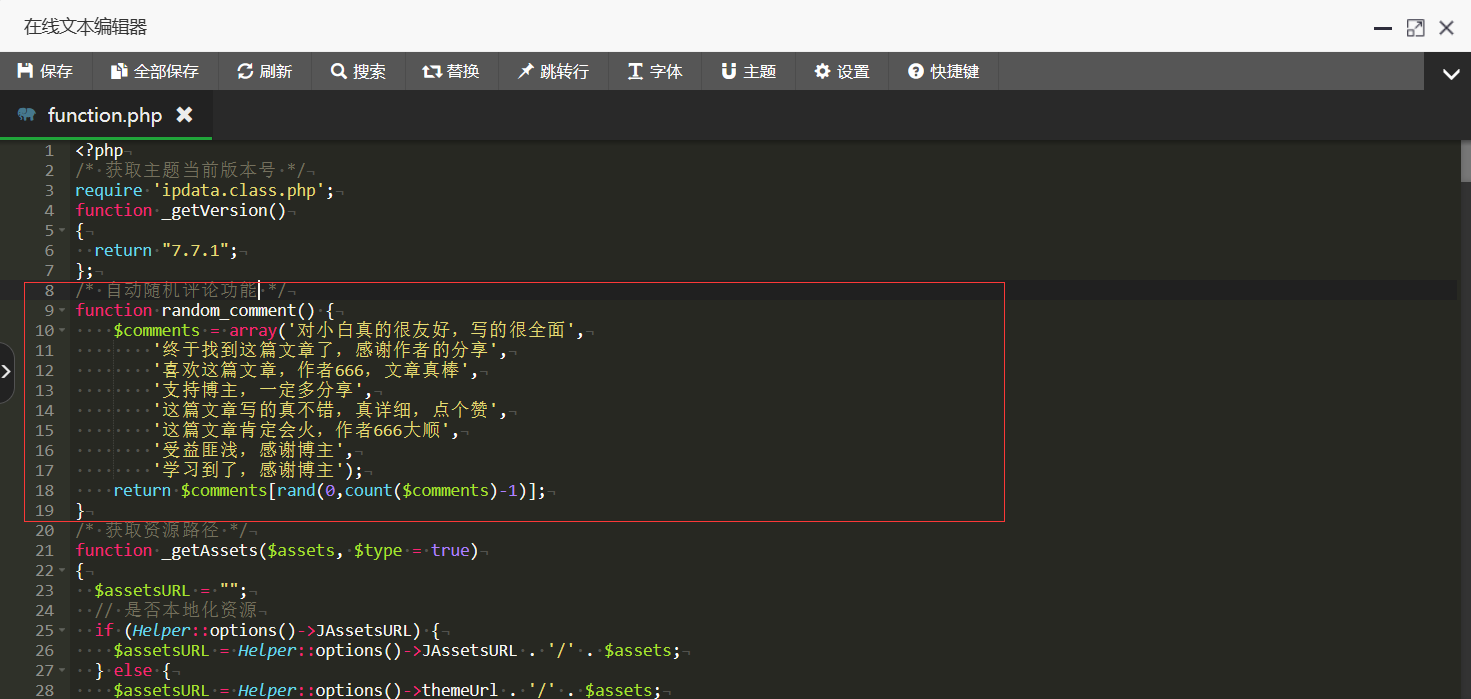
实现评论时自动随机输入一条评论功能 修改 core/function.php将下面代码复制粘贴到joe/function.php文件里!{tabs}{tabs-pane label="效果图"}{/tabs-pane}{tabs-pane label="代码"}/* 自动随机评论功能 */ function random_comment() { $comments = array('对小白真的很友好,写的很全面', '终于找到这篇文章了,感谢作者的分享', '喜欢这篇文章,作者666,文章真棒', '支持博主,一定多分享', '这篇文章写的真不错,真详细,点个赞', '这篇文章肯定会火,作者666大顺', '受益匪浅,感谢博主', '学习到了,感谢博主'); return $comments[rand(0,count($comments)-1)]; }{/tabs-pane}{/tabs} 修改public/comment.php将下面代码覆盖到joe/public/comment.php文件里的同样位置!{tabs}{tabs-pane label="效果图"}{/tabs-pane}{tabs-pane label="代码"}<textarea class="text joe_owo__target" name="text" value="" autocomplete="new-password" placeholder="说点什么吧,点击右上方切换成画图试试?"><?php echo random_comment(); ?></textarea>{/tabs-pane}{/tabs}